
The Silent Time Thief Hiding in Your Daily Office Work
I still remember sitting at my desk late at night, staring at a giant spreadsheet. My eyes were burning, and my wrists ached from copying data from one sheet to another. It was a cold Tuesday, and my family was already asleep at home.
I felt trapped in a loop of clicking, copying, and pasting. It felt like my brain was slowly turning off. I knew there had to be a better way to work, but I did not know where to start.
Many office workers face this same struggle every single day. You wake up early, drink your coffee, and sit down hoping to do meaningful work. Instead, you spend hours moving files, sending the same email, or filling out forms. It feels like you are a robot trapped in a human body.
This repetitive work does more than just waste your time. It slowly drains your energy and kills your creativity. By the time you go home, you are too tired to enjoy life with your family. Your mind feels heavy, and you dread the next morning.
We often accept this stress as a normal part of our jobs. But it does not have to be this way. No one should lose their peace of mind over a spreadsheet.
The truth is, manual work leads to mistakes that can cost your business heavily. When you are tired, you easily type a wrong number or delete a key file. These small slips create huge problems that you have to spend more hours fixing.
I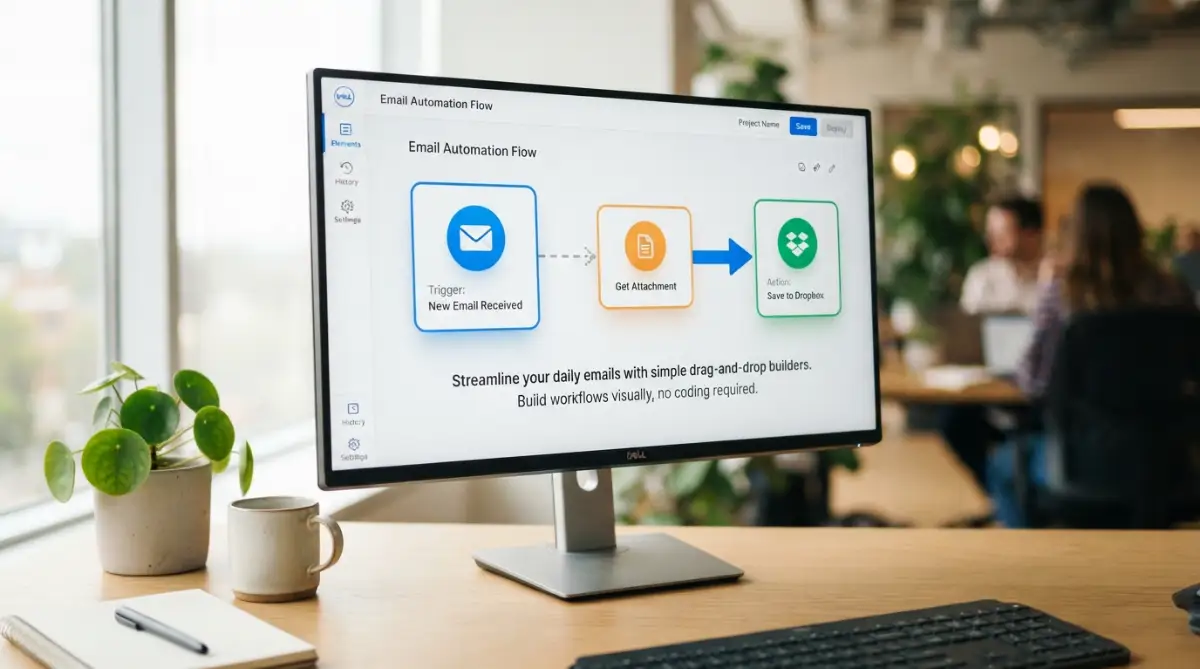
How to Reclaim Your Time with Low-Code Solutions
Before we talk about the tools, let us understand what low-code actually means. It is simply a way to build software helpers without writing computer code. You use visual menus and drag-and-drop buttons to connect your favorite apps.
If you can make a slide deck, you can build an automated workflow. It is that simple and does not require a tech degree.
Spotting Your Biggest Office Time Wasters
The first step to freedom is finding the tasks that steal your time. These are usually the things you do over and over every day. If a task requires no deep thinking, it is a perfect candidate for automation.
Think about your daily routine. Do you download email attachments and save them to a shared drive? Do you copy lead information from a website into a database?
Write down every task you repeat more than three times a day. This list will be your roadmap to saving hours of work each week.
Picking the Right Low-Code Tool for Your Work
There are many great tools available today that require zero coding skills. You do not need to buy expensive software or hire software developers. Instead, you can use simple tools that fit your current workflow.
Let us look at some of the best options you can start using today.
Want to see a real-life example of how this works in action? Watch this simple walk-through to see how you can set up your first automation in under five minutes.
To help you choose, let us compare the top three tools in the market. Each one has its own strengths depending on your needs.
My Personal Pro Tip: I once tried to build a massive system on my first day and it failed completely. My advice is to start with one tiny task, like saving email attachments to a folder. Once you see that work, you will gain the confidence to build bigger flows.
Building Your Very First Automated Workflow
Now, let us walk through how to build your first digital helper. We will use a very simple example that anyone can set up in ten minutes. Imagine you want to save every email receipt to your cloud storage.
First, you need to set up a trigger. A trigger is the event that starts the automation, like "new email received."
Second, you define the action. The action is what the tool does next, like "save attachment to folder."
Once you connect these two steps, the tool runs in the background. You do not have to click a single button ever again.
Myth vs. Reality in Office Automation
Many people have wrong ideas about automation. Let us clear up some common myths so you can proceed with confidence.
- Myth: Automation will take away my job.
- Reality: Automation takes away the boring parts, giving you time to do the work that actually matters.
- Myth: I need to be a programmer to use these tools.
- Reality: If you can use Facebook or send an email, you can easily use these drag-and-drop tools.
- Myth: Low-code systems are only for giant corporations.
- Reality: Small businesses and single freelancers save the most time using these tools.
Testing and Polishing Your New Workflow
After building your helper, you must test it to make sure it works correctly. Run the system once with a test file to see if everything lands in the right place.
Sometimes, things might not work perfectly on the first try. Do not worry because fixing a low-code flow is very easy.
You just need to check the error message in the tool. It will tell you exactly which step went wrong so you can adjust it.
How Automation Protects Your Daily Mental Health
When you stop doing boring tasks, your workday changes completely. You no longer feel like a machine typing away without a purpose.
Instead, you can focus on creative projects and talking to real people. This shifts your mood from stressed to excited.
Your mind stays fresh throughout the day. You leave the office with energy left to spend on your hobbies and loved ones.
Real-Life Examples of Simple Automations You Can Try
Let us look at some practical ways people use these tools in real offices. These examples will help you think of ideas for your own desk.
One common use is social media scheduling. You can write your posts in a spreadsheet and let a tool post them automatically.
Another great idea is customer feedback alerts. When a client fills out a form, the tool can text you the details instantly.
You can also automate your invoice reminders. The system can check who has not paid and send a polite note automatically.
Keeping Your Automated Systems Safe and Organized
As you build more helpers, you need to keep them organized. Give each workflow a clear name so you know what it does.
Also, make sure you do not share sensitive passwords in your workflows. Use the built-in secure connections provided by the tools.
It is a good habit to check your systems once a month. This ensures everything is running smoothly without any issues.
Sharing the Power of Automation with Your Team
Once you see how much time you save, you should share it. Show your coworkers how you automated your boring tasks.
They will be amazed at how fast you get your work done. You can even build shared workflows that help the whole office.
This makes the entire team more productive and less stressed. You will become the office hero without writing a line of code.
Taking Your First Step Today
You do not have to automate everything overnight. Just pick one small task that you dislike doing the most.
Spend fifteen minutes setting up a simple low-code helper today. You will be surprised by how much better you feel tomorrow.
The future of work is not about working harder. It is about working smarter and keeping your peace of mind.
Leveling Up: Pro Secrets for Flawless System Integration
Once you understand the basics of connecting your daily apps, you can explore advanced methods to save even more time. The true magic happens when you connect more than two systems together.
Instead of just sending an email when a form is filled, you can send a chat alert to your team and save the details in a database. This multi-step approach turns small tasks into a fully automated system that works while you sleep.
To build these advanced workflows, you do not need to learn complex programming concepts. You just need to organize your steps in a logical order, much like planning a simple daily schedule.
Setting Up Intelligent Filters and Conditions
Sometimes you do not want your automated helper to run every single time an event happens. For example, you might only want to save invoices that are larger than a certain amount of money.
This is where visual filters come in handy to keep your database clean. Most simple drag-and-drop tools let you add rules that say "only continue if this specific box is checked."
Adding these rules prevents your systems from getting cluttered with useless information. It also keeps your software costs low because you only run the system when it is truly necessary.
Tracking Your Systems to Stop Errors Early
Building a great helper is only half the work. You also need to know when a connection breaks so you can fix it before it affects your customers.
Most good platforms will send you an email alert the moment a step fails to run. Setting up these automatic warnings helps you maintain a highly professional business environment.
For example, managing complex automated systems is a lot like how machine learning predicts future trends in big data to avoid system failures before they happen. This proactive approach ensures your business never stops running smoothly.
A detailed report on Gartner Peer Insights for enterprise low-code platforms shows that error-tracking is the most requested feature for growing teams[1]. When you monitor your systems, you protect your business from costly data entry mistakes.
Organizing Your Visual Workflow Screens
As you build more helpers, your main dashboard can quickly become a messy pile of icons. To avoid this confusion, you should name every single step with a highly descriptive label.
Instead of naming a step "Action 1," you can name it "Send Welcome Email to New Client." This small habit saves you hours of confusion when you need to update your workflow later.
You can also use color-coded folders to keep different projects separate. This is highly useful when you share your automation dashboard with other members of your team.
For those looking to expand their digital skills, learning to structure these visual steps is as simple as learning how to write better AI image prompts for perfect results on your screen. Clear structures always lead to better digital outcomes.
The Dangerous Pitfalls That Can Break Your Automated Systems
When people discover the power of simple automation, they often get overly excited. They try to automate every single task in their office on the very first day.
This approach usually leads to broken systems and a lot of frustration. It is far better to build slowly and test each step before moving to the next task.
If you rush this building process, you might accidentally send wrong emails to your valuable clients. These simple mistakes can hurt your professional reputation and cause unnecessary stress.
Ignoring the Power of Easy Open-Source Tools
Many people spend thousands of dollars on expensive enterprise software when they first start out. They assume that a higher price tag always means a better product.
They often overlook why smart small businesses switched to open source tools to keep their workflows cheap and flexible. Open-source options can save you a massive amount of money while giving you complete control over your files.
Before buying any expensive software license, always check if there is a free or open-source alternative. This keeps your startup costs low and protects your budget from monthly subscription traps.
Forgetting to Clean Up Your System Inputs
An automated system is only as good as the data you put into it. If your customers type their names in all lowercase letters, your automated emails will look highly unprofessional.
You should always use built-in text formatters to clean up the data before it reaches your main database. These formatting tools can automatically fix capitalization, dates, and phone numbers.
Taking this extra step ensures your business always looks highly polished and reliable. It also prevents errors when your system tries to read poorly formatted numbers.
The Trap of Over-Complicating Your Systems
Another common mistake is building a system that has too many moving parts. If one small link in a giant chain breaks, the entire system stops working instantly.
Keep your workflows as simple as possible by dividing large tasks into smaller, independent chunks. This makes it much easier to find and fix errors when they happen.
It also means that if one system fails, the rest of your business can keep running without any major issues. Simplicity is always the best policy when designing digital systems.
According to a workplace productivity study featured in the Harvard Business School research on digital transformation, simplifying daily digital tasks is key to reducing employee burnout[2]. Teams that use straightforward, simple systems are far happier than those stuck in complex digital loops.
Your Roadmap to a Stress-Free, Productive Workday
You do not have to live your life stuck in a cycle of endless copy-paste work. By using simple visual tools, you can let your computer handle the boring tasks while you focus on what you love.
This shift does not require a background in computer programming or a giant budget. It only requires a willingness to learn and fifteen minutes of your time today.
As you build your first digital helpers, you will feel a deep sense of relief. You will finally have the time to grow your business, connect with clients, and enjoy your personal life.
Your Simple Action Plan for Tomorrow
- List Your Tasks: Write down three boring computer tasks that you repeat every single day.
- Pick One Tool: Sign up for a free account on a visual builder platform like Zapier or Make.
- Build a Helper: Set up a simple two-step automation, like saving email receipts to a folder, and test it.
I used to spend half my day doing tasks that my computer can now finish in seconds. My life changed completely once I trusted these simple systems to do the heavy lifting for me. I highly encourage you to build your very first digital helper today and feel the relief yourself.
Your Questions Answered: Making Automation Easy
Will using low-code tools slow down my computer?
No, these tools run completely in the secure cloud, so they do not use your computer memory. You can turn off your laptop and your automated helpers will keep working in the background.
Do I need to pay for these software systems right away?
Almost all popular visual workflow builders offer a generous free plan for beginners. You only need to pay if you want to run hundreds of tasks every day or use advanced features.
Can I automate tasks on my smartphone too?
Yes, most of these platforms have excellent mobile apps that let you monitor your systems on the go. You can even set up triggers that start when you arrive at a specific location or receive a text.
How do I know if my company data is safe?
Trusted platforms use high-level encryption to protect your passwords and client information. Always make sure to use strong passwords and enable two-factor authentication on your accounts.
Disclaimer
This blog post is for educational and informational purposes only. While we share proven strategies to help you automate tasks, individual results may vary depending on your specific systems and setup. Always test your workflows in a safe environment before using them for active business tasks. We do not guarantee specific time savings or profits from using these third-party tools.