
The Exhausting Reality of Managing Daily Business Tasks Manually
I remember sitting at my wooden desk last month, staring blankly at a mountain of unread client emails and messy spreadsheets. My head was spinning because I had spent four hours just copying contact data from one screen to another. It felt like I was drowning in endless manual work, and my creative energy was completely gone.
I asked myself if this was really what running a business was supposed to look like. That night, I realized something had to change before I burned out completely. I knew I could not keep living this way if I wanted my business to survive.
Many small business owners face this exact same struggle every single day. You wake up with a long list of tasks, but you spend your best hours doing repetitive things that do not actually grow your brand. This constant rush to catch up drains your energy and steals your focus.
It deeply hurts your mental peace, making you feel constantly stressed and tired. When you are always stuck in the mud of daily chores, you lose the joy of creating new things. Your family time gets cut short because you are still replying to basic customer questions late at night.
The worst part is knowing that a simple human typo could ruin your entire week of hard work. We often think that hiring more people is the only way to solve this ongoing pressure. But adding more manual steps usually just adds more confusion and higher costs to your plate.
The good news is that smart tools can handle these boring chores easily. By shifting these heavy tasks to smart digital helpers, you can finally take a deep breath. Let us look at how you can get your precious hours back and find your peace of mind again.
Smart Ways to Hand Over Your Heavy Workload to Intelligent Systems
Finding the Tasks That Steal Your Precious Time
Before you can start fixing your system, you need to know where your hours are actually going. Take a piece of paper and write down every single activity you do during your workday. You will likely find that a few repetitive tasks are eating up most of your energy.
Look for actions that you have to repeat more than five times a day. This includes typing the same email replies, moving files, or updating client lists. These small tasks might seem quick, but they add up to hours of lost time each week.
Once you have this list, you can easily see which chores are ready to be handed over to smart tools. The goal is to clear these repetitive blocks from your schedule. This lets you focus on the creative decisions that actually bring in revenue.
The Golden Rule of Simple Process Selection
Not every single business task is a good fit for automation right away. You should always start with the simplest, most predictable tasks first. If a process does not require deep emotional thinking, it is perfect for a smart system.
For example, sending a confirmation message when someone fills out a form is a simple process. It follows a clear rule: when a user does an action, the system sends a reply. These basic "if-this-then-that" setups are the safest starting point.
Avoid trying to set up systems for highly personal interactions, like solving complex client complaints. Keep those personal tasks on your own plate for now. Focus your digital tools on the basic administrative steps that require zero creative thinking.
Getting Your Tools to Talk to Each Other
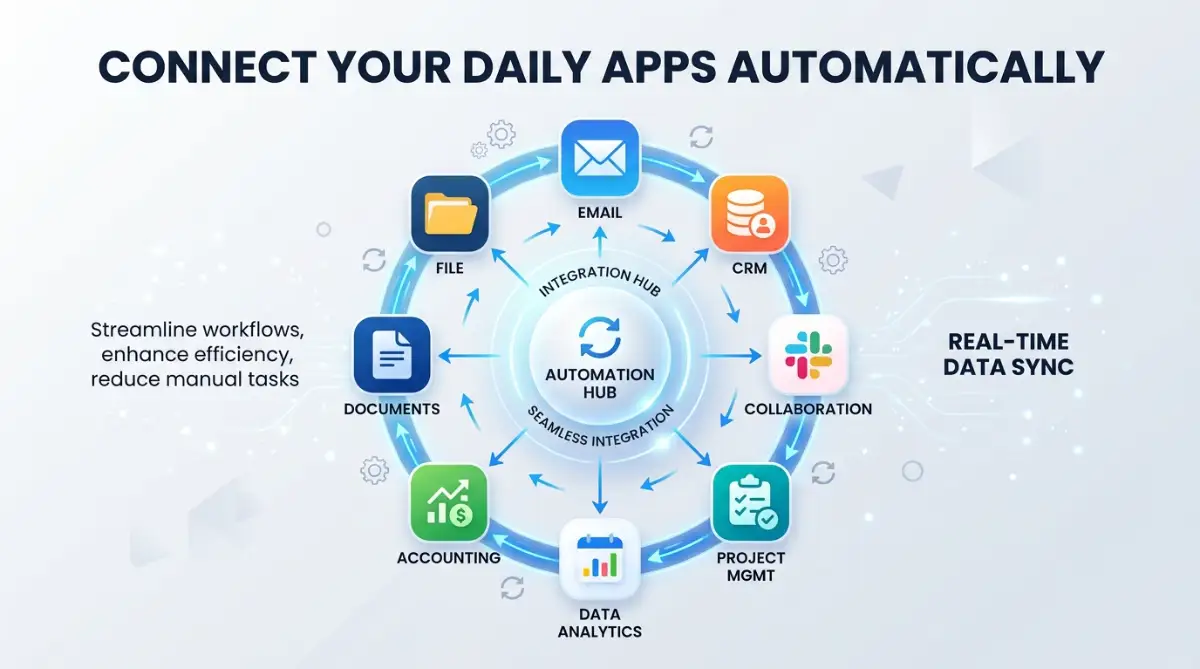
Most businesses use several different applications that do not naturally communicate with each other. You might use one app for email, another for spreadsheets, and a third for managing clients. Moving information between these separate systems manually is a huge time waste.
You can use smart bridge tools to connect these different applications together. These bridge tools act like translators, passing data smoothly from one application to the next. When a new row is added to your sheet, the bridge tool can automatically send a notification.
This saves you from constant copy-pasting and prevents costly copy errors. It ensures that your data is always consistent across all your active platforms. Best of all, it happens instantly behind the scenes while you focus on other work.
Sorting Incoming Messages and Questions Automatically
Customer emails can quickly become a full-time job if you do not manage them carefully. Many of the inquiries you receive every day are probably asking the exact same questions. You do not need to type the same answers over and over again.
Smart mail systems can read incoming messages and sort them into specific folders. They can even scan for key phrases like "pricing" or "support" and draft a reply automatically. You can review these drafts before they go out, or let the system send them directly.
This means your customers get instant answers to their questions, even during weekends. It makes your brand look highly professional and responsive without requiring you to work twenty-four hours a day. Your inbox will finally stop feeling like a scary place to open.
Managing Your Client Information Without Typing
Keeping client profiles updated is necessary for sales, but typing in details is incredibly boring. Every time a new client books a call, their details should automatically go into your master list. Doing this manually leads to missed details and forgotten leads.
You can set up a system where booking a meeting instantly creates a new client card in your system. The system can pull their name, email, and meeting notes into one organized space. This gives you a clear view of your relationships without any extra typing.
When you prepare for a meeting, all the information you need is already waiting for you. This makes your workflow feel incredibly smooth and organized. You will never have to hunt through old chat logs to find a client's email address again.
A Quick Word of Advice From My Experience
I once tried to automate my entire sales setup in just one single evening. It was a massive disaster because everything broke at once, and I felt completely defeated. My advice is to start with just one tiny task, make sure it works, and only then move to the next step.
Scheduling Social Media and Content Ideas Easily
Sharing updates on social media is great for growth, but posting manually every day is exhausting. It breaks your concentration and forces you to stay glued to your phone. Instead, you can batch your content creation into one single afternoon.
You can use scheduling systems to write and arrange your posts weeks in advance. These systems will publish your updates at the exact times your audience is most active. This keeps your online presence active while you focus on offline business tasks.
Some smart tools can even help you draft ideas based on topics you like. They can suggest headlines or write quick summaries from your longer articles. This turns a long, tiring chore into a quick and enjoyable creative session.
Creating Simple Weekly Progress Reports
To run a healthy business, you need to know your numbers, but gathering reports takes a lot of effort. You have to open multiple dashboards, copy metrics, and paste them into a summary sheet. Because this takes so long, many business owners simply skip doing it.
You can set up automated reporting tools that gather these metrics for you every single week. These systems collect data from your sales, website visits, and email list growth. They compile everything into a simple, easy-to-read weekly email sent directly to your inbox.
This gives you a clear snapshot of your business health without any manual effort. You can make smart decisions based on real data rather than just guessing. It keeps you informed and in control of your growth every single week.
Designing a Smooth Onboarding Flow for New Clients
When a client decides to work with you, the first few steps set the tone for the entire project. Sending welcome files, contracts, and payment links manually can feel very slow. A delay in this process might make a client regret their decision to hire you.
An automated onboarding sequence can send a welcome pack the second a client signs up. The system can automatically deliver the contract, collect the signature, and send the first invoice. Once the payment is confirmed, it can send them a link to book their first call.
This creates an amazing first impression and makes the client feel valued and safe. It also saves you from sending awkward follow-up emails about unsigned documents. The entire process runs smoothly in the background while you prepare for the actual work.
Seeing Smart Automation in Real Action
If you want to see exactly how these smart workflows look when they are running, this guide explains it step by step. Watching a quick visual setup will make your learning path much easier and faster.
Common Pitfalls to Avoid When Setting Up Your First System
The biggest mistake people make when starting is trying to automate a process that is already broken. If your manual way of doing a task is confusing, automating it will only make the confusion happen faster. Always clean up your manual steps before you let a tool take over.
Another common trap is using too many different tools at the same time. This creates a messy web of systems that is very difficult to manage when something goes wrong. Try to keep your setup as simple as possible by using versatile, well-known platforms.
Finally, do not forget to tell your team or clients how the new system works. Let them know what messages they will receive and how they should interact with the new setup. Clear communication prevents confusion and makes the transition incredibly smooth for everyone.
How to Test Your New System Before Going Live
Never turn on a new automated system without testing it thoroughly first. You do not want your clients receiving broken emails or blank documents by mistake. Always run a complete test using your own personal email address.
Fill out your own forms, schedule test meetings, and check if the data flows to the right places. Look closely at the formatting of the automatic messages to ensure they look friendly and professional. If you find a mistake, fix it and run the test one more time.
Once you have successfully run a few error-free tests, you can safely launch the system for your clients. This gives you absolute confidence that your automation is helping your business rather than hurting it. You can sit back and watch your workflows run smoothly on their own.
Taking Your System Setup to the Next Level
Once you have automated your most basic tasks, you can start building more advanced systems to run your business operations. Instead of just connecting one app to another, you can create multi-layered pathways that handle complex projects from start to finish. These advanced systems can make smart decisions on their own based on the rules you set for them.
For example, when a new customer fills out a contact form, a multi-layered system can analyze the request first. It can check the client's budget, identify their specific needs, and assign them to the right team member automatically. This ensures your leads are handled by the best person without you ever having to sort through them manually.
To understand how these advanced connections work under the hood, you can explore academic studies on operational technology integration to see how modern enterprises build these systems. These studies prove that structured systems save thousands of hours of manual labor. They help you run a highly organized business that functions smoothly even when you are away from your desk.
Using Open-Source Options for Absolute Control
While popular paid automation tools are incredibly easy to use, they can quickly become expensive as your business grows. Many smart business owners switch to self-hosted systems to keep their monthly operating costs low. These alternative tools give you complete ownership over your data and let you customize your workflows without limits.
If you want to save money while building a highly secure system, you should consider moving away from expensive proprietary software. You can learn about open-source tools for business tasks to find amazing free alternatives that perform just as well. These tools allow you to build custom pathways without paying per-task fees.
Using these open-source systems requires a bit more technical setup in the beginning. However, the long-term savings and absolute control over your private customer information make the effort completely worth it. You can build a safe, independent business setup that never depends on a third-party company's pricing updates.
Predicting Customer Behavior with Smart Data
Advanced business setups do more than just move data; they help you understand what your customers will do next. By analyzing past sales records, smart systems can pinpoint exactly when a customer is likely to buy from you again. This allows you to send targeted offers at the perfect moment without doing any manual tracking.
These systems use advanced analytics to find hidden patterns in huge chunks of customer behavior data. If you want to know more about how these modern systems read data patterns, look into how machine learning models for business data are used to make highly accurate predictions. This technology can tell you which products will be popular next month so you can prepare your inventory.
Instead of guessing what your market wants, you can make decisions based on clear, factual evidence. This scientific approach to management helps you avoid overstocking or missing out on key sales trends. It changes your business from reactive to highly proactive, keeping you several steps ahead of your competitors.
Managing Project Workflows for Large Teams
Keeping a group of workers aligned on a project can be incredibly difficult when everyone is working from different locations. If you rely on manual check-ins, tasks will inevitably slip through the cracks, causing missed deadlines and unhappy clients. You can build an automated system that updates task boards and sends reminders to your team members automatically.
When a designer finishes a draft, the system can automatically notify the writer and set a deadline for the next step. This keeps the project moving forward without requiring a manager to oversee every single update. Everyone knows exactly what they need to do and when it is due.
To keep your projects organized, you should check out this guide on managing project workflows for remote workers to find the absolute best setup for your team. Using the right tool prevents communication mix-ups and keeps everyone motivated. Your team will feel more independent, and you will spend much less time in boring update meetings.
Tracking Long-Term Efficiency to Measure Success
You cannot improve what you do not measure, so you must track how much time and money your automated systems are saving. Every month, review your workflows to see which connections are running smoothly and which ones are hitting errors. This regular check-up keeps your digital helper running at peak performance.
According to prominent state of business automation studies, companies that regularly audit their setups enjoy much higher team satisfaction rates. They are able to catch small errors before they cause real problems for their customers. This simple practice ensures you get the absolute best return on your technology investments.
Set aside thirty minutes at the end of each month to review your system logs. Look for any bottlenecks where tasks are getting delayed or failing to trigger. Making small adjustments to your systems will keep your business running like a well-oiled machine.

Serious Failures That Can Ruin Your Automation Progress
The Threat of Automating a Broken Process
The absolute fastest way to ruin your business reputation is to automate a process that is already broken. If your customer service method is confusing, setting up a system to send automated replies will only spread that confusion faster. You must make sure your manual workflow is clean, simple, and effective before you try to connect any digital tools to it.
Imagine a scenario where a client receives three conflicting automated emails within five minutes of signing up. This immediately makes your brand look disorganized and unprofessional. It breaks the trust you worked so hard to build, and it can drive your clients straight into the arms of your competitors.
Always take the time to map out your steps on paper and test them manually with a real person first. Make sure every email template is clear, every link works, and every step serves a real purpose. Only when the manual process is absolutely perfect should you let an automated system take over.
Losing Your Personal Connection with Clients
It is incredibly tempting to automate every single communication in your business to save time. However, if your clients feel like they are talking to a cold, heartless machine, they will quickly lose interest in your brand. People buy from people, and losing that warm human touch can completely destroy your customer loyalty.
Recent Stanford research on AI-human collaboration shows that customers are far happier when technology is used to assist humans, rather than replace them. You should use automation to handle the boring background chores, like generating invoices or organizing files. This actually frees up your schedule so you can have deep, meaningful conversations with your clients.
Keep your automated emails sounding warm, friendly, and highly natural. Avoid using stiff, robotic language, and always give your clients an easy way to reach a real person. Finding the perfect balance between system efficiency and human warmth is the ultimate secret to long-term business success.
Ignoring Small Errors Until They Grow Too Big
An automated system can run quietly in the background for months without any issues, which can make you lazy. You might stop checking your logs, assuming that everything is working perfectly. However, a single update to one of your external apps can quietly break your entire system without warning.
If a connection breaks, you might miss important client emails or fail to process customer payments for days. This can cause massive delays, loss of revenue, and immense stress for your entire team. You can easily avoid this nightmare by setting up simple error notifications.
Configure your system to send you a text message or a special notification the moment any automated workflow fails. This allows you to jump in and fix the issue immediately before your clients ever notice a problem. Being proactive about system maintenance will save you from major headaches down the road.
Creating High-Quality Media Assets for Your Brand
When setting up your online presence, you need visually appealing graphics to catch the eye of potential clients on social media. Using generic stock photos can make your brand look cheap and uninteresting. You can use smart design tools to generate highly professional graphics that match your business theme perfectly.
To get the absolute best results from these modern design systems, you need to write clear descriptions of what you want to create. You can read about crafting high-quality visual prompts to learn how to guide these design tools effectively. This skill allows you to build beautiful branded images without hiring an expensive graphic designer.
Having unique, high-quality images on your website and social pages builds instant credibility. It shows your audience that you care about quality and pay attention to the smallest details. This simple upgrade can significantly increase your website traffic and lead conversions.
Expanding Your Business Limits with Immersive Tech
As your business grows, you might want to look into new ways to showcase your products to clients online. Many forward-thinking brands are using interactive digital environments to give customers a virtual tour of their services. This is especially useful for service providers, real estate agents, and online educators.
This interactive technology is quickly moving out of the gaming world and into the mainstream business space. To see how these tools are being used, explore how immersive tech solutions in modern work are helping brands connect with global audiences. This allows you to offer virtual consultations that feel incredibly real and engaging.
By offering these modern experiences, you make your brand stand out as a true leader in your field. It gives your clients a unique, memorable way to interact with your services. This helps you build a strong, modern brand that people love to talk about.
Your Simple Action Plan to Reclaim Your Workday
Starting your automation journey does not have to feel overwhelming or scary. You do not need to rewrite your entire business model overnight to see the amazing benefits of smart systems. By taking one small step at a time, you can slowly build a business that works for you.
Begin by automating just one simple, annoying task that you absolutely hate doing every day. Once you see that system running successfully, you will feel a massive wave of relief and motivation. You can find more expert tech guides and automation resources to help you plan your next steps and keep your momentum going strong.
I remember how terrified I was when I set up my very first automated client reply. I was so worried it would send the wrong message, but seeing it work perfectly changed my life forever. I promise that once you take that first brave step, you will never want to go back to the old, stressful way of doing things.
Disclaimer
This article is for informational purposes only. The software, tools, and strategies mentioned should be thoroughly tested to fit your specific business needs. The author is not responsible for any technical issues, loss of data, or operational disruptions resulting from the implementation of these setups.
Common Questions About AI System Automation
How do I know if my business is ready for automation?
If you find yourself spending more than two hours a day on repetitive tasks like data entry, scheduling, or copying files, you are definitely ready. You do not need a large team or a massive budget to start using these smart systems. Beginning with just one connected process will immediately free up valuable hours in your daily schedule.
Will automated systems make my customer relationships feel too cold?
Only if you automate the wrong parts of your business, like deeply personal support conversations. If you use smart systems for background chores and keep your automated emails warm and friendly, your clients will love the fast response times. This actually gives you more free time to connect with your customers on a deeper, more personal level.
Do I need to know how to write code to set up these workflows?
No, you do not need any coding skills at all to build highly effective automated systems today. Most modern automation tools use simple visual drag-and-drop builders that anyone can learn in a few minutes. You can easily connect your favorite apps and design complete workflows by simply following the on-screen guides.
How much money does it cost to start automating my business?
You can actually start automating your daily business tasks completely for free. Many of the best automation platforms offer generous free plans that allow you to run hundreds of basic tasks every month without paying a dime. As your business grows and your workflows become more complex, you can slowly upgrade to paid options that fit your budget.